Quickstart/Cheat-Sheet
To start using pyglotaran in your analysis, you only have to import the Project class and open a project.
[1]:
from glotaran.project import Project

quickstart_project = Project.open("quickstart_project")
quickstart_project
[1]:
If the project does not already exist this will create a new project and its folder structure for you. In our case we had only the models + parameters folders and the data + results folder were created when opening the project.
[2]:
%ls quickstart_project
data/ models/ parameters/ project.gta results/
Let us get some example data to analyze:
[3]:
from glotaran.testing.simulated_data.sequential_spectral_decay import DATASET as my_dataset

my_dataset
[3]:
<xarray.Dataset> Size: 1MB
Dimensions:   (time: 2100, spectral: 72)
Coordinates:
  * time      (time) float64 17kB -1.0 -0.99 -0.98 -0.97 ... 19.97 19.98 19.99
  * spectral  (spectral) float64 576B 600.0 601.4 602.8 ... 696.6 698.0 699.4
Data variables:
    data      (time, spectral) float64 1MB 0.01372 0.01082 ... 2.562 2.31
Attributes:
source_path: dataset_1.ncLike all data in pyglotaran, the dataset is a xarray.Dataset. You can find more information about the xarray library the xarray hompage.
The loaded dataset is a simulated sequential model.
Plotting raw data
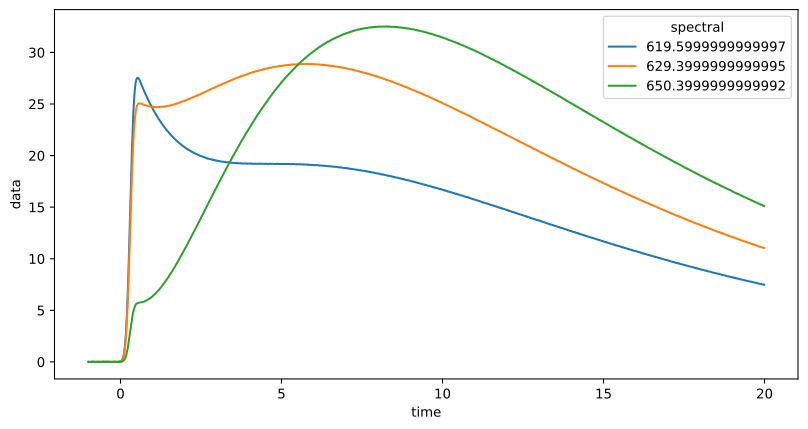
Now lets plot some time traces.
[4]:
plot_data = my_dataset.data.sel(spectral=[620, 630, 650], method="nearest")
plot_data.plot.line(x="time", aspect=2, size=5);
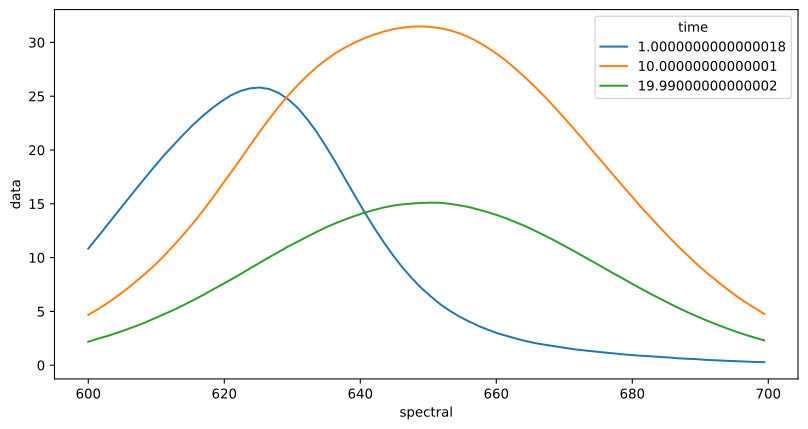
We can also plot spectra at different times.
[5]:
plot_data = my_dataset.data.sel(time=[1, 10, 20], method="nearest")
plot_data.plot.line(x="spectral", aspect=2, size=5);
Import the data into your project
As long as you can read your data into a xarray.Dataset or xarray.DataArray you can directly import it in to your project.
This will save your data as NetCDF (.nc) file into the data folder inside of your project with the name that you gave it (here quickstart_project/data/my_data.nc).
If the data format you are using is supported by a plugin you can simply copy the file to the data folder of the project (here quickstart_project/data).
[6]:
quickstart_project.import_data(my_dataset, dataset_name="my_data")
quickstart_project
[6]:
After importing our quickstart_project is aware of the data that we named my_data when importing.
Preparing data
To get an idea about how to model your data, you should inspect the singular value decomposition. As a convenience the load_data method has the option to add svd data on the fly.
[7]:
dataset_with_svd = quickstart_project.load_data("my_data", add_svd=True)
dataset_with_svd
[7]:
<xarray.Dataset> Size: 2MB
Dimensions:                      (time: 2100, spectral: 72,
                                  left_singular_value_index: 72,
                                  singular_value_index: 72,
                                  right_singular_value_index: 72)
Coordinates:
  * time                         (time) float64 17kB -1.0 -0.99 ... 19.98 19.99
  * spectral                     (spectral) float64 576B 600.0 601.4 ... 699.4
Dimensions without coordinates: left_singular_value_index,
                                singular_value_index, right_singular_value_index
Data variables:
    data                         (time, spectral) float64 1MB 0.01372 ... 2.31
    data_left_singular_vectors   (time, left_singular_value_index) float64 1MB ...
    data_singular_values         (singular_value_index) float64 576B 6.577e+0...
    data_right_singular_vectors  (spectral, right_singular_value_index) float64 41kB ...
Attributes:
    source_path:  /home/docs/checkouts/readthedocs.org/user_builds/pyglotaran...
loader: <function load_dataset at 0x7f9441f9a710>First, take a look at the first 10 singular values:
[8]:
plot_data = dataset_with_svd.data_singular_values.sel(singular_value_index=range(10))
plot_data.plot(yscale="log", marker="o", linewidth=0, aspect=2, size=5);
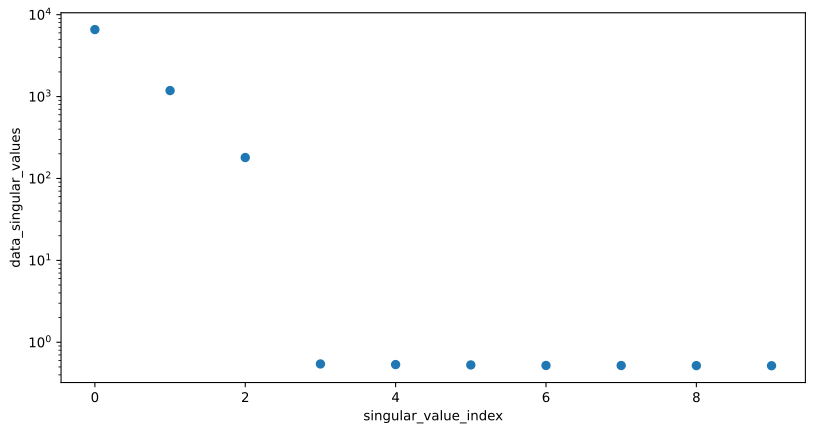
This tells us that our data have at least three components which we need to model.
Working with models
To analyze our data, we need to create a model.
Create a file called my_model.yaml in your projects models directory and fill it with the following content.
[9]:
quickstart_project.show_model_definition("my_model")
[9]:
default_megacomplex: decay

initial_concentration:
  input:
    compartments: [s1, s2, s3]
    parameters: [input.1, input.0, input.0]

k_matrix:
  k1:
    matrix:
      (s2, s1): kinetic.1
      (s3, s2): kinetic.2
      (s3, s3): kinetic.3

megacomplex:
  m1:
    k_matrix: [k1]

irf:
  irf1:
    type: gaussian
    center: irf.center
    width: irf.width

dataset:
  my_data:
    initial_concentration: input
    megacomplex: [m1]
    irf: irf1
You can check your model for problems with the validate method.
[10]:
quickstart_project.validate("my_model")
[10]:
Your model is valid.
Working with parameters
Now define some starting parameters. Create a file called parameters.yaml in your projects parameters directory with the following content.
[11]:
quickstart_project.show_parameters_definition("my_parameters")
[11]:
input:
  - ["1", 1, { "vary": False }]
  - ["0", 0, { "vary": False }]

kinetic: [0.51, 0.31, 0.11]

irf:
  - ["center", 0.31]
  - ["width", 0.11]
Note the { "vary": False } which tells pyglotaran that those parameters should not be changed.
You can use validate method also to check for missing parameters.
[12]:
quickstart_project.validate("my_model", "my_parameters")
[12]:
Your model is valid.
Since not all problems in the model can be detected automatically it is wise to visually inspect the model. For this purpose, you can just load the model and inspect its markdown rendered version.
[13]:
quickstart_project.load_model("my_model")
[13]:
Model
Dataset Groups
default
Label: default
Residual Function: variable_projection
K Matrix
k1
Label: k1
Matrix: {(‘s2’, ‘s1’): ‘kinetic.1’, (‘s3’, ‘s2’): ‘kinetic.2’, (‘s3’, ‘s3’): ‘kinetic.3’}
Megacomplex
m1
Label: m1
Dimension: time
Type: decay
K Matrix: [‘k1’]
Initial Concentration
input
Label: input
Compartments: [‘s1’, ‘s2’, ‘s3’]
Parameters: [‘input.1’, ‘input.0’, ‘input.0’]
Exclude From Normalize: []
Irf
irf1
Label: irf1
Normalize: True
Backsweep: False
Type: gaussian
Center: irf.center
Width: irf.width
Dataset
my_data
Label: my_data
Group: default
Force Index Dependent: False
Megacomplex: [‘m1’]
Initial Concentration: input
Irf: irf1
The same way you should inspect your parameters.
[14]:
quickstart_project.load_parameters("my_parameters")
[14]:
input:
Label
Value
Standard Error
t-value
Minimum
Maximum
Vary
Non-Negative
Expression
1
1.000e+00
nan
nan
-inf
inf
False
False
None0
0.000e+00
nan
nan
-inf
inf
False
False
Noneirf:
Label
Value
Standard Error
t-value
Minimum
Maximum
Vary
Non-Negative
Expression
center
3.100e-01
nan
nan
-inf
inf
True
False
Nonewidth
1.100e-01
nan
nan
-inf
inf
True
False
Nonekinetic:
Label
Value
Standard Error
t-value
Minimum
Maximum
Vary
Non-Negative
Expression
1
5.100e-01
nan
nan
-inf
inf
True
False
None2
3.100e-01
nan
nan
-inf
inf
True
False
None3
1.100e-01
nan
nan
-inf
inf
True
False
None
Optimizing data
Now we have everything together to optimize our parameters.
[15]:
result = quickstart_project.optimize("my_model", "my_parameters")
result
   Iteration     Total nfev        Cost      Cost reduction    Step norm     Optimality
       0              1         1.1176e+04                                    1.73e+06
       1              2         1.4982e+01      1.12e+04       1.96e-02       1.26e+04
       2              3         7.5549e+00      7.43e+00       5.86e-03       1.01e+03
       3              4         7.5510e+00      3.85e-03       1.74e-05       6.57e-02
       4              5         7.5510e+00      1.62e-11       2.68e-09       4.67e-06
Both `ftol` and `xtol` termination conditions are satisfied.
Function evaluations 5, initial cost 1.1176e+04, final cost 7.5510e+00, first-order optimality 4.67e-06.
[15]:
Optimization Result |
|
|---|---|
Number of residual evaluation |
5 |
Number of residuals |
151200 |
Number of free parameters |
5 |
Number of conditionally linear parameters |
216 |
Degrees of freedom |
150979 |
Chi Square |
1.51e+01 |
Reduced Chi Square |
1.00e-04 |
Root Mean Square Error (RMSE) |
1.00e-02 |
Model
Dataset Groups
default
Label: default
Residual Function: variable_projection
K Matrix
k1
Label: k1
Matrix: {(‘s2’, ‘s1’): ‘kinetic.1(5.00e-01±6.78e-05, t-value: 7370, initial: 5.10e-01)’, (‘s3’, ‘s2’): ‘kinetic.2(3.00e-01±3.93e-05, t-value: 7626, initial: 3.10e-01)’, (‘s3’, ‘s3’): ‘kinetic.3(1.00e-01±4.23e-06, t-value: 23665, initial: 1.10e-01)’}
Megacomplex
m1
Label: m1
Dimension: time
Type: decay
K Matrix: [‘k1’]
Initial Concentration
input
Label: input
Compartments: [‘s1’, ‘s2’, ‘s3’]
Parameters: [‘input.1(1.00e+00, fixed)’, ‘input.0(0.00e+00, fixed)’, ‘input.0(0.00e+00, fixed)’]
Exclude From Normalize: []
Irf
irf1
Label: irf1
Normalize: True
Backsweep: False
Type: gaussian
Center: irf.center(3.00e-01±5.04e-06, t-value: 59551, initial: 3.10e-01)
Width: irf.width(1.00e-01±6.72e-06, t-value: 14878, initial: 1.10e-01)
Dataset
my_data
Label: my_data
Group: default
Force Index Dependent: False
Megacomplex: [‘m1’]
Initial Concentration: input
Irf: irf1
Each time you run an optimization the result will be saved in the projects results folder.
[16]:
%ls "quickstart_project/results"
my_model_run_0000/
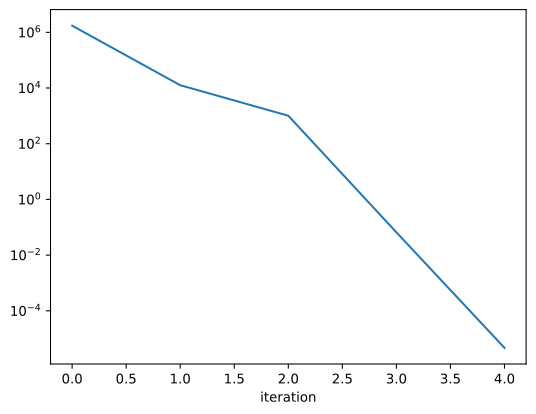
To visualize how quickly the optimization converged we ca plot the optimality of the optimization_history.
[17]:
result.optimization_history.data["optimality"].plot(logy=True)
[17]:
<Axes: xlabel='iteration'>
[18]:
result.optimized_parameters
[18]:
input:
Label
Value
Standard Error
t-value
Minimum
Maximum
Vary
Non-Negative
Expression
1
1.000e+00
nan
nan
-inf
inf
False
False
None0
0.000e+00
nan
nan
-inf
inf
False
False
Noneirf:
Label
Value
Standard Error
t-value
Minimum
Maximum
Vary
Non-Negative
Expression
center
3.000e-01
5.038e-06
59551
-inf
inf
True
False
Nonewidth
1.000e-01
6.722e-06
14878
-inf
inf
True
False
Nonekinetic:
Label
Value
Standard Error
t-value
Minimum
Maximum
Vary
Non-Negative
Expression
1
5.000e-01
6.785e-05
7370
-inf
inf
True
False
None2
3.000e-01
3.934e-05
7626
-inf
inf
True
False
None3
1.000e-01
4.226e-06
23665
-inf
inf
True
False
None
You can inspect the data of your result by accessing data attribute. In our example it only contains our single my_data dataset, but it ca contain as many dataset as you analysis needs.
[19]:
result.data
[19]:
{'my_data': <xarray.Dataset>}
my_data
<xarray.Dataset> Size: 6MB
Dimensions:                          (time: 2100, spectral: 72,
                                      left_singular_value_index: 72,
                                      singular_value_index: 72,
                                      right_singular_value_index: 72,
                                      clp_label: 3, species: 3,
                                      component_m1: 3, species_m1: 3,
                                      to_species_m1: 3, from_species_m1: 3)
Coordinates:
  * time                             (time) float64 17kB -1.0 -0.99 ... 19.99
  * spectral                         (spectral) float64 576B 600.0 ... 699.4
  * clp_label                        (clp_label) <U2 24B 's1' 's2' 's3'
  * species                          (species) <U2 24B 's1' 's2' 's3'
  * component_m1                     (component_m1) int64 24B 1 2 3
    rate_m1                          (component_m1) float64 24B 0.5 0.3 0.1
    lifetime_m1                      (component_m1) float64 24B 2.0 3.334 10.0
  * species_m1                       (species_m1) <U2 24B 's1' 's2' 's3'
    initial_concentration_m1         (species_m1) float64 24B 1.0 0.0 0.0
  * to_species_m1                    (to_species_m1) <U2 24B 's1' 's2' 's3'
  * from_species_m1                  (from_species_m1) <U2 24B 's1' 's2' 's3'
Dimensions without coordinates: left_singular_value_index,
                                singular_value_index, right_singular_value_index
Data variables: (12/21)
    data                             (time, spectral) float64 1MB 0.01372 ......
    data_left_singular_vectors       (time, left_singular_value_index) float64 1MB ...
    data_singular_values             (singular_value_index) float64 576B 6.57...
    data_right_singular_vectors      (spectral, right_singular_value_index) float64 41kB ...
    residual                         (time, spectral) float64 1MB 0.01372 ......
    matrix                           (time, clp_label) float64 50kB 6.193e-39...
    ...                               ...
    irf_center                       float64 8B 0.3
    irf_width                        float64 8B 0.1
    decay_associated_spectra_m1      (spectral, component_m1) float64 2kB 31....
    a_matrix_m1                      (component_m1, species_m1) float64 72B 1...
    k_matrix_m1                      (to_species_m1, from_species_m1) float64 72B ...
    k_matrix_reduced_m1              (to_species_m1, from_species_m1) float64 72B ...
Attributes:
    source_path:                      /home/docs/checkouts/readthedocs.org/us...
    model_dimension:                  time
    global_dimension:                 spectral
    root_mean_square_error:           0.009994067940565503
    weighted_root_mean_square_error:  0.009994067940565503
    dataset_scale:                    1
loader: <function load_dataset at 0x7f9441f9a710>Visualize the Result
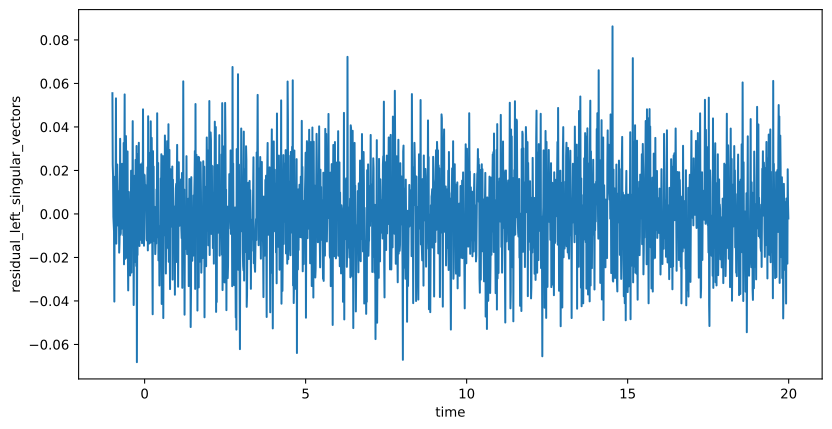
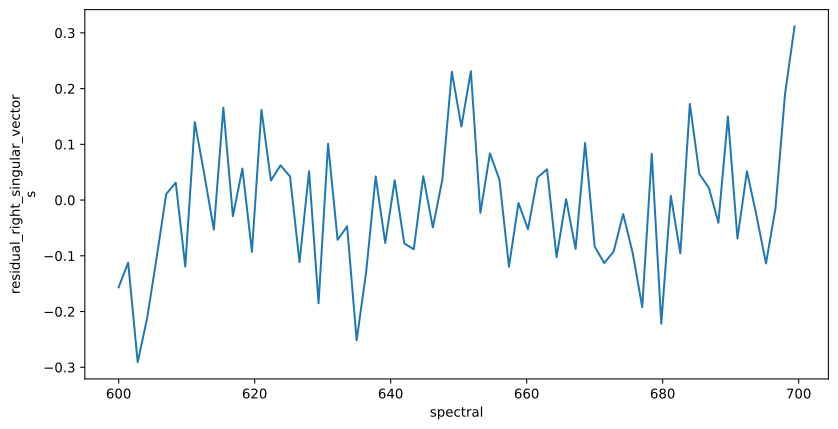
The resulting data can be visualized the same way as the dataset. To judge the quality of the fit, you should look at first left and right singular vectors of the residual.
[20]:
result_dataset = result.data["my_data"]

residual_left = result_dataset.residual_left_singular_vectors.sel(left_singular_value_index=0)
residual_right = result_dataset.residual_right_singular_vectors.sel(right_singular_value_index=0)
residual_left.plot.line(x="time", aspect=2, size=5)
residual_right.plot.line(x="spectral", aspect=2, size=5);